Showing posts with label jQuery. Show all posts

Tuesday, June 7, 2016

10 Best Online Resources to Learn jQuery

jQuery is a fast, small, and feature-rich JavaScript library. It makes things like HTML document traversal and manipulation, event handling, animation, and Ajax much simpler with an easy-to-use API that works across a multitude of browsers.
Looking at the popularity of JQuery it is a must to learn for all the developers and designers. So, here we bring you a list of top 10 free online resources where you can master your JQuery skills.

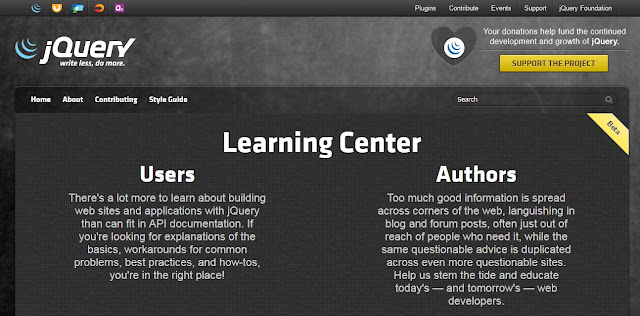
Learn.jQuery is the best place to start learning as it focuses on basics, deals with common problems faced by developer and makes you familiar with the standard practices of JQuery. 


It covers topic such as JQuery introduction, events, Ajax calls, use of plugins, code organization etc.


jQuery API Documentation is another place to start learning as it focuses on jQuery API, deals with common problems faced by developer and makes you familiar with the standard API of JQuery.


 It covers topic such as JQuery introduction, events, Ajax calls, use of plugins, code organization etc.


Tutorialspoint has been in these business from a long time and explain things in the simplest way possible. The JQuery course is very structured and can be understood even by a beginner.


 It starts with the basics and covers topic like attributes, CSS, DOM, AJAX etc. and then move towards advanced topics like Interactions, Widgets, Theming, Plugin and Utilities.


Snoopcode provide you a Step-by-step introduction to the jQuery. Learn the building blocks of jQuery and make the web more interactive with custom animations


At the end of the jQuery tutorial, you can find more than 100 examples. With online editor, you can edit and test each example yourself.

Codeademy is place to start learning jQuery as it focuses on basics, introduction of jQuery. It covers topic such as JQuery functions, dynamic HTML, jQuery events, effects and jQuery projects.


Stackoverflow, the best website to learn jQuery is your own website, seriously. Give yourself a tough project and just google for solutions to any obstacles, there is no better way to learn than pure experience. You will write horrible code, and as fast as a couple days later you'll be able to recognize the horrible mistakes you made a week earlier, but never stop and never feel confident.


The first year at least will consist almost entirely of this incremental learning process, even when you feel you've got it all down. stackoverflow.com is the best website to learn by practice and fix your own practical issue.


7) w3 Schools
w3schools is doing a remarkable job in providing tutorials on various technologies. You just name the technology and you will find a tutorial related to that on w3schools. The tutorials on JQuery covers every topic and has an online editor as well where you can perform things practically.


The tutorial starts with an introduction of JQuery and then digs deep into the technology as we progress further.

8) jqfundamentals
jQuery Fundamentals is designed to get you comfortable working through common problems you'll be called upon to solve using jQuery. To get the most out of this site, you'll want to read the content and try the various interactive examples.

Each chapter will cover a concept and give you a chance to try example code related to the concept.

9) jquery-tutorial 
jquery-tutorial helps you learn jQuery online so that you can leverage your skills in creating animation and building interactive websites. Tutorials covers all jQuery basics and step by step explanation to learn jQuery.


10) Learning jQuery

Learning jQuery is designed to get you Tips, techniques, and tutorials for the jQuery JavaScript library.

This website provides tutorials for Bignner, intermediate and for Advace.

So these are the 10 the best free website to learn jQuery in easily and better manner. Hope you all will love those resources.


Thursday, April 21, 2016

jQuery Interview Questions and Answers for Freshers

1. What is jQuery?

jQuery is not a programming language but a well written JavaScript code. It is a JavaScript code, which do document traversing, event handling, Ajax interactions and Animations.


2. Why jQuery is needed?

jQuery is needed for the following list:

Used to develop browser compatible web applications
Improve the performance of an application
Very fast and extensible
UI related functions are written in minimal lines of codes
3. Whether jQuery HTML work for both HTML and XML documents?

No, jQuery HTML only works for HTML documents not for XML Documents.

4. What are the methods used to provide effects?

Some of the effects methods are:

Show()
Hide()
Toggle()
FadeIn() and
FadeOut()
5. What is the advantage of using minimized version of jQuery?

Efficiency of web page increases when minimized version of jQuery is used.min.js file will be more than 50% less than the normal js file. Reduction in the file size makes the web page faster.

Jquery
Jquery
6. Is jQuery is a JavaScript or JSON library file?

jQuery is a library of JavaScript file and it consists of DOM, event effects and the Ajax functions. jQuery is said to be a single JavaScript file.

7. Which operating system is more compatible with jQuery?

Mac, Windows and Linux are more compatible with the jQuery.

8. How can we include jQuery library in ASP.Net project?

Download the jQuery library from jQuery.com and include that reference in the asp.net page.

9. Which command will give a version of jQuery?

The command $.ui.version returns jQuery UI version.

10. In what scenarios jQuery can be used?

jQuery can be used in following scenarios:

Apply CSS static or dynamic
Calling functions on events
Manipulation purpose
Mainly for Animation effects
11. What is the difference between find and children methods?

Find method is used to find all levels down the DOM tree but children find single level down the DOM tree.

12. What is jQuery connect?

A ' jQuery connect'  is a plugin used to connect or bind a function with another  function. Connect is used to execute function from any other function or plugin is executed.

13. How to use connect?

Connect can be used by downloading jQuery connect file from jQuery.com and then include that file in the HTML file. Use $.connect function to connect a function to another function.

14. What are the features of jQuery, has been used in web applications?

jQuery uses features like Sliding, File uploading and accordian in web applications.

15. What are the browser related issues for jQuery?

Browser compatibility of jQuery plugin is an issue and needs lot of time to fix it.

16. Whether we need to add jQuery file in both Master and Content page?

jQuery file should be added to the Master page and can use access from the content page directly without having any reference to it.

17. What are the basic selectors in jQuery?

Following are the basic selectors in jQuery:

Element ID
CSS Name
Tag Name
DOM hierarchy
18. Can we call C# code behind using jQuery?

Yes, we can call C# code from jQuery as it supports .net application.

19. What is the use jQuery.data method?

jQuery.data methods is used to associate the data with the DOM nodes and the objects. This data method makes the jQuery code clear and concise.

20. What is the use of each function in jQuery?

Each function is used to iterate each and every element of an object. It is used to loop DOM elements, arrays and the object properties.

21. What is the difference between size and length of jQuery?

Size and length both returns the number of element in an object. But length is faster than the size because length is a property and size is a method.

22. Can we add more than one ‘document.ready’ function in a page?

Yes, we can add more than one document.ready function in a page. But, body.onload can be added once in a page.

23. What is the use of jQuery load method?

jQuery load method is a powerful AJAX method which is used to load the data from a server and assign the data into the element without loading the page.

24. Whether our own specific characters are used in place of $ in jQuery?

Yes, We can use our own variable in place of $ by suing the method called no Conflict () method.

var sample = $.noConflict()

25. What are the four parameters used for jQuery Ajax method?

The four parameters are

URL – Need to specify the URL to send the request
type – Specifies type of request(Get or Post)
data – Specifies data to be sent to server
Cache – Whether the browser should cache the requested page
26. What is the use of jQuery filter?

The jQuery filter is used to filter the certain values from the object list based on the criteria. Example is to filter certain products from the master list of products in a cart website.

27. Which program is useful for testing jQuery?

QUnit is used to test jQuery and it is very easy and efficient.

28. What is CDN?

CDN is abbreviated as Content Distribution network and it is said to be a group of companies in different location with network containing copies of data files to maximize bandwidth in accessing the data.

29. What are the two types of CDNs?

There are two types of CDNs:

Microsoft – Load jQuery from Ajax CDN
Google – Load jQuery from Google libraries API
30. Which sign is used as a shortcut for jQuery?

Dollar ($) sign is used as a shortcut for jQuery.

31. Is jQuery is a client or server scripting?

jQuery is a client scripting.

32. What is the script build up by jQuery?

jQuery is a Javascript file and it is single javascript file that contains common DOM, event effects and Ajax functions.

33. How can we debug jQuery?

There are two ways to debug jQuery:

Debugger keyword

Add the debugger to the line from where we have to start debugging and then run Visual Studio in Debug mode with F5 function key.
Insert a break point after attaching the process
34. What are all the ways to include jQuery in a page?

Following are the ways to include jQuery in a page:

Local copy inside script tag
Remote copy of jQuery.com
Remote copy of Ajax API
Local copy of script manager control
Embedded script using client script object
35. What is the use of jQuery.ajax method ()?

jQuery.ajax method is used for asynchronous HTTP requests.

36. Where can we download JQuery?

jQuery javascript can be downloaded from jQuery official website – www.jquery.com

37. Is jQuery is a replacement of JavaScript?

No, jQuery is not a replacement of JavaScript.

38. What is called chaining?

Chaining is used to connect multiple events and functions in a selector.

39. What are the advantages of jQuery?

Following are the advantages of jQuery:

Just a JavaScript enhancement
Coding is simple, clear, reusable
Removal of writing more complex conditions and loops
40. Whether C# code behind can be called from jQuery?

Yes, we can call C# code behind from jQuery.

41. What is the use of jQuery.data() method?

jQuery data method is used to associate data with DOM nodes and JavaScript objects. This method will make a code very concise and neat.

42. What is the difference between onload() and document.ready()?

In a page, we can have only one onload function but we can have more than one document.ready function. Document.ready function is called when DOM is loaded but onload function is called when DOM and images are loaded on the page.

43. What is the use of jQuery each function?

jQuery each function is used to loop through each and every element of the target jQuery object. It is also useful for multi element DOM, looping arrays and object properties.

44. How method can be called inside code behind using jQuery?

$.ajax can be called and by declaring WebMethod inside code behind using jQuery.

45. Which is the fastest selector in jQuery?

ID and Element are the fastest selectors in jQuery.

46. What is the slowest selector in jQuery?

Class selectors are the slowest selectors in jQuery.

47. Where jQuery code is getting executed?

jQuery code is getting executed on a client browser.

48. What is the method used to define the specific character in place of $ sign?

‘NoConflict’ method is used to reference a jQuery and save it in a variable. That variable can be used instead of Sign.

49. Why jQuery is better than JavaScript?

jQuery is a library used for developing Ajax application and it helps to write the code clean and concise. It also handles events, animation and Ajax support applications.

50. What are the types of selectors in jQuery?

There are three types of selectors in jQuery:

CSS Selector
XPath Selector
Custom Selector